How to Add AI Features to Your App: A 2026 Developer’s Integration Guide
Contents
- The "Beyond the API" Reality: Orchestration, Context, and Cost-Control
- The 3 Pillars of AI Integration: An LLM Integration Patterns Framework
- Pillar 1: The Knowledge Layer — RAG and Vector Databases
- Pillar 2: The Logic Layer — Choosing the Right Model
- Pillar 3: The Action Layer — Agents and Function Calling
- Step-by-Step Implementation: Adding AI Features to Your App in 2026
- Step 1: Data Chunking and Embedding — Preparing Your Knowledge Base
- Step 2: Prompt Engineering and Templates — Moving Beyond Hardcoded Strings
- Step 3: Streaming and UI/UX — Solving the Latency Problem
- The 2026 AI Integration Toolset: Standards for Moving Fast
- The Production Readiness Checklist
- The Difference Between Shipping and Scaling
- Don't Build in the Dark.
There is a specific moment that most developers experience when they start integrating AI into a production application. It goes something like this: they call the OpenAI API, get a response, display it in a <div>, and think—that wasn't so hard.
Then the product manager asks: "Can it remember our conversation history?" Then the CTO asks: "Why is this costing $800 a month for 2,000 users?" Then a user reports that the AI confidently gave them completely wrong information about the company's return policy. Then someone on the security team asks what data is being sent to a third-party API.
The fetch() request was the easy part. Everything after it is where real AI integration lives—and where most development teams find themselves underprepared.
This guide is for developers and product engineers who are past the "Hello World" phase and need a clear, production-oriented map of how AI features are actually built, deployed, and maintained in 2026. It covers the three architectural layers of every serious AI integration, a step-by-step implementation sequence, and the tooling that has become the industry standard for moving fast without building fragile systems.
The "Beyond the API" Reality: Orchestration, Context, and Cost-Control
The mental model that gets developers into trouble is treating an LLM API like any other API—a service you call with a request and receive a deterministic response. It is not that.
A database query given the same inputs always returns the same outputs. An LLM given the same inputs will return similar outputs with subtle variations, will occasionally hallucinate, will degrade in quality when the context window is poorly managed, and will consume tokens—and therefore money—at a rate directly proportional to how carelessly you construct your prompts.
In 2026, building AI features that work in production requires thinking across three distinct concerns simultaneously:
Orchestration is how you coordinate the sequence of operations that produce an AI response. A user submits a question. You retrieve relevant documents from a knowledge base. You construct a prompt that includes those documents plus the conversation history. You call the LLM. You parse the response to check if it requires a tool call. You execute the tool. You return the final response to the user. Each of these steps can fail independently, and the orchestration layer is what handles the sequencing, error recovery, and retry logic.
Context is what the LLM knows at the moment of inference. Every LLM has a context window—a maximum amount of text it can process at once. For a real application with conversation history, proprietary knowledge, system instructions, and user input all competing for space in that window, context management is a genuine engineering problem. Too little context and the model lacks the information to give accurate answers. Too much context and you burn tokens unnecessarily, slow down responses, and can paradoxically degrade response quality.
Cost-Control is the operational reality that most AI integration tutorials skip entirely. LLM API calls are not free, and costs scale non-linearly with careless implementation. Sending 10,000 tokens of context for a query that requires 200 tokens of context is a 50x cost amplification. Without caching, rate limiting, model routing (using a cheaper model for simple tasks and an expensive model only for complex reasoning), and prompt optimisation, AI features will routinely generate infrastructure bills that shock engineering leadership.
These three concerns—not the API call itself—are what separates a proof-of-concept AI feature from a production-grade one. Everything in this guide is oriented around addressing them.
The 3 Pillars of AI Integration: An LLM Integration Patterns Framework
Every robust AI feature in a production application can be mapped to three architectural layers that work in concert. Understanding each layer independently before thinking about how they connect is the clearest path to getting the architecture right.
Pillar 1: The Knowledge Layer — RAG and Vector Databases
The most important limitation of every LLM is also its least-discussed one: the model knows nothing about your business.
It does not know your product catalogue. It does not know your company's support policies. It does not know the contracts your legal team signed last quarter or the internal documentation your engineering team wrote last month. When an LLM is asked about any of these things without access to them, it has two options: say it doesn't know, or confabulate something plausible and wrong. In production, it frequently chooses the second.
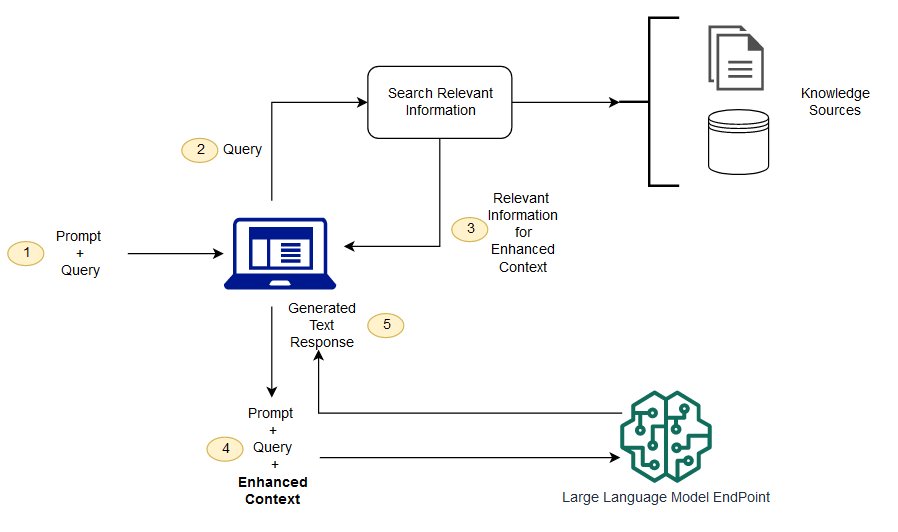
Retrieval-Augmented Generation (RAG) solves this by giving the model access to your proprietary knowledge at query time—not by retraining the model (expensive, slow, requires ML expertise), but by retrieving the most relevant pieces of your data and including them in the prompt.
How RAG actually works:
Your documents (support articles, product descriptions, internal policies, contracts) are chunked into manageable pieces, converted into vector embeddings (numerical representations that capture semantic meaning), and stored in a vector database. When a user submits a query, that query is also converted to an embedding, and the vector database performs a similarity search—finding the chunks of your knowledge base whose meaning is most similar to the query. Those chunks are injected into the prompt alongside the user's question, and the LLM answers with access to the right context.
Vector database options in 2026:
Pinecone is the managed option—no infrastructure to maintain, a straightforward API, and reliable performance at scale. It is the fastest path to a production RAG system if you do not want to manage database infrastructure. The tradeoff is cost at high query volumes and the fact that your data lives in a third-party service.
Weaviate is the open-source option that can be self-hosted, giving you full control over your data and no per-query costs at scale. It has a more complex setup but adds native support for hybrid search (combining vector similarity with keyword search), which often outperforms pure vector search for domain-specific queries.
pgvector is the pragmatic choice for teams already running PostgreSQL. It adds vector search capability to your existing database, eliminating the need for a separate infrastructure component. Performance at very large scale does not match dedicated vector databases, but for most applications it is sufficient and meaningfully simpler to operate.
The chunking decision matters more than most guides admit. Chunks that are too large include irrelevant information that dilutes the signal. Chunks that are too small lose the surrounding context that makes a passage meaningful. For most document types, chunks of 300–500 tokens with a 50-token overlap between adjacent chunks is a reasonable starting point. For structured data (FAQs, product specs), smaller chunks per discrete item often work better.
Pillar 2: The Logic Layer — Choosing the Right Model
Not every AI task in your application requires the most capable and expensive model available. Treating every inference call as an identical commodity is one of the primary drivers of runaway AI infrastructure costs.
In 2026, the model selection decision has matured into a structured engineering choice, not a default to whatever the current flagship model happens to be.
Claude 3.5 Sonnet (Anthropic) is the current practical standard for tasks requiring multi-step reasoning, nuanced instruction following, and reliable structured output. If your feature involves synthesising information from multiple retrieved documents, generating a technically complex explanation, or following a detailed system prompt with many conditional instructions, Claude 3.5 Sonnet's reasoning quality justifies its token cost. It is also notably strong at code generation and explanation tasks, making it relevant for developer-facing AI features.
GPT-4o (OpenAI) competes closely with Claude 3.5 Sonnet on reasoning tasks and adds multimodal capability—accepting image inputs alongside text. For features that involve processing screenshots, documents with visual layouts, or user-uploaded images alongside text queries, GPT-4o's vision capability is practically relevant.
Llama 3 (Meta, self-hosted) changes the cost and privacy calculus entirely. Running Llama 3 locally or on your own cloud infrastructure means no per-token API costs and no data leaving your network. For applications handling sensitive financial data, medical records, or legal documents where sending data to a third-party API creates compliance risk, local model hosting is not a preference—it is a requirement. The tradeoff is infrastructure complexity and the fact that self-hosted open-source models currently trail the frontier models on complex reasoning tasks. For simpler tasks (intent classification, short-form text generation, summarisation of structured data), the quality gap is negligible.
Gemini Flash (Google) and similar "small but fast" models are the right choice for high-volume, lower-complexity tasks: classifying user intent before routing to the appropriate workflow, generating short metadata summaries, or validating that an AI response meets a basic format requirement before displaying it. Using a $0.002/1K-token model for these tasks instead of a $0.015/1K-token model can reduce AI infrastructure costs by 80% for the portion of your traffic they handle.
The practical model routing pattern: Most production AI features benefit from a tiered approach. Use a fast, cheap model for the first pass (intent classification, simple queries), and route to a more capable model only when the task complexity warrants it. This pattern is implementable in LangChain and LangGraph routing nodes, and it is one of the highest-leverage cost optimisations available.
Pillar 3: The Action Layer — Agents and Function Calling
RAG gives your AI application knowledge. The Action Layer gives it the ability to do something with that knowledge.
Without function calling, an AI feature can answer questions and generate text. With function calling, it can send an invoice, create a support ticket, query your live database, update a CRM record, or trigger a workflow in your internal systems. The difference between an AI chatbot and an AI agent is, at its core, whether the model has been given tools it can invoke.
How function calling works:
You define a set of functions—their names, descriptions, and parameter schemas—and pass them to the LLM alongside the user's message. The LLM, if it determines that invoking one of those functions is the appropriate next step, returns a structured response indicating which function to call and with what arguments. Your application executes the function, returns the result to the LLM, and the LLM incorporates the result into its final response.
The critical architectural detail: the LLM does not execute the function. It decides which function to call and with what parameters. Your application does the execution. This distinction matters for security (you control what the AI can actually do) and for error handling (function execution failures are caught in your application layer, not inside the model).
import OpenAI from "openai";

const client = new OpenAI({
apiKey: process.env.OPENAI_API_KEY,
});

// Example function (tool)
function getWeather({ city }) {
return The weather in ${city} is sunny.;
}

// Tool definition
const tools = [
{
type: "function",
function: {
name: "getWeather",
description: "Get weather information for a city",
parameters: {
type: "object",
properties: {
city: {
type: "string",
description: "City name",
},
},
required: ["city"],
},
},
},
];

async function runAgent() {
let messages = [
{ role: "user", content: "What's the weather in Mumbai?" },
];

while (true) {
const response = await client.chat.completions.create({
model: "gpt-4o-mini",
messages,
tools,
tool_choice: "auto",
});
const message = response.choices[0].message;
messages.push(message);

// ✅ If model calls a function
if (message.tool_calls) {
  for (const toolCall of message.tool_calls) {
    const { name, arguments: args } = toolCall.function;
    const parsedArgs = JSON.parse(args);

    let result;

    // Call actual function
    if (name === "getWeather") {
      result = getWeather(parsedArgs);
    }

    // Push function result back to conversation
    messages.push({
      role: "tool",
      tool_call_id: toolCall.id,
      content: result,
    });
  }
} else {
  // ✅ Final response (no more function calls)
  console.log("Final Answer:", message.content);
  break;
}

}
}

runAgent();
Designing tool schemas for reliability:
The quality of your function descriptions directly determines how reliably the model selects and invokes them. Vague descriptions produce unreliable tool selection. Specific, action-oriented descriptions with clear parameter documentation produce consistent behaviour.
Compare these two function descriptions for the same tool:
Vague: "Get invoice data"
Specific: "Retrieve a specific invoice by invoice_id and return its status, amount, due date, and line items. Use this when the user is asking about the status or details of a specific invoice, not when they are asking for a list of invoices."
The second description gives the model the context it needs to choose this tool at the right moment and avoid it at the wrong moment.
Agentic loops and when to use them:
A simple function-calling implementation runs one iteration: the model suggests a tool call, you execute it, the model responds. An agentic loop allows multiple iterations: the model calls a tool, reviews the result, decides whether it needs to call another tool, executes that, and continues until it has the information needed to respond. LangGraph is the current standard for implementing these multi-step agentic workflows in a way that is observable, debuggable, and interruptible.
Agentic loops are powerful and should be used carefully. Each iteration adds latency and cost. Without clear termination conditions and maximum iteration limits, a poorly specified agent can run indefinitely. Always define: what conditions cause the loop to terminate, what the maximum number of iterations is, and what happens if the loop reaches that limit without a satisfactory answer.
Step-by-Step Implementation: Adding AI Features to Your App in 2026
Step 1: Data Chunking and Embedding — Preparing Your Knowledge Base
The quality of a RAG system is largely determined before the first user query is processed. How you prepare your data for the vector store directly determines how relevant the retrieved context will be.
The chunking process:
Begin by auditing your data sources. Different document types require different chunking strategies. Narrative documents (blog posts, policy documents) chunk well by paragraph or by token count with overlap. Structured documents (FAQs, product specs) often chunk better by logical unit (one FAQ item per chunk). Code documentation benefits from chunking by function or class definition.
The overlap parameter between adjacent chunks matters for query retrieval. A 10–20% overlap ensures that a query whose answer spans a chunk boundary still retrieves the relevant context from one of the adjacent chunks.
The embedding process:
Once chunked, each piece of text is converted to a vector embedding using an embedding model. OpenAI's text-embedding-3-small is the standard cost-effective choice for English text. For multilingual applications or on-premises requirements, sentence-transformers with a model like all-MiniLM-L6-v2 is a strong open-source alternative.
The embedding model you use for indexing and the embedding model you use for query-time retrieval must be the same. Mixing embedding models produces unreliable similarity scores.
Metadata strategy:
Store relevant metadata alongside each chunk in the vector database: source document ID, document type, creation date, section heading, and any relevant categorical tags. This metadata enables filtered search—"retrieve only from the support documentation, not the product catalogue"—which dramatically improves retrieval precision for multi-source knowledge bases.
Keeping the knowledge base current:
Static knowledge bases that are never updated become liabilities. Build an ingestion pipeline from the beginning, not as an afterthought. When a document is updated, re-embed and replace its chunks. When a document is deleted, remove its chunks. Stale knowledge in a RAG system produces confidently wrong answers.
Step 2: Prompt Engineering and Templates — Moving Beyond Hardcoded Strings
The gap between a developer who treats prompt engineering as an afterthought and one who treats it as a first-class engineering concern is measurable in production quality. Prompts that are hardcoded as strings in application code are prompt antipatterns. They cannot be versioned, tested, or optimised without a code deployment. They do not scale.
The prompt template pattern:
Structure your prompts as templates with explicit variable substitution for dynamic content. A RAG system prompt template might look like:
You are a support assistant for {company_name}.
Answer the user's question using ONLY the information in the context below.
If the answer is not in the context, say "I don't have that information" — do not speculate.

Context:
{retrieved_chunks}

Conversation History:
{conversation_history}

User Question:
{user_question}
The variables (company_name, retrieved_chunks, conversation_history, user_question) are populated at runtime. The structure, tone instructions, and constraints are stable and version-controlled separately from the application logic.
Prompt versioning:
Store prompt templates in your version control system as first-class files—not buried in application code. When you modify a prompt, the change is tracked in git with a commit message explaining why. This practice enables: rolling back to a previous prompt version when a change degrades quality, A/B testing prompt variants against each other, and auditing prompt history when investigating a production issue.
The instruction hierarchy:
Your system prompt (the persistent instructions that shape the model's behaviour) should be structured from highest to lowest priority: role definition → behavioural constraints → task-specific instructions → output format requirements. Models follow the beginning of a prompt more reliably than the end. Put your most important constraints first.
Testing prompts systematically:
Build a small evaluation dataset—20 to 50 representative queries with expected responses or quality criteria—before deploying a new prompt to production. Run your candidate prompts against this dataset and compare outputs. This practice, sometimes called "prompt regression testing," catches quality degradations before users encounter them.
Step 3: Streaming and UI/UX — Solving the Latency Problem
An LLM generating a 400-token response at typical generation speeds takes 4–8 seconds to complete. Displaying a loading spinner for 8 seconds and then rendering the full response is an unacceptable user experience for a conversational feature. Users will assume the feature is broken.
Streaming solves this by delivering the response token-by-token (or chunk-by-chunk) as it is generated. The user sees text appearing incrementally, which creates the perception of speed even when the total time-to-complete is identical.
Server-Sent Events (SSE) for streaming:
SSE is the standard transport mechanism for streaming AI responses from a backend to a frontend. The server opens a persistent HTTP connection and pushes data chunks as they arrive from the LLM API. The frontend listens for these events and appends each chunk to the displayed response.
A Node.js/Express streaming endpoint for a chat feature looks structurally like this:
javascript
res.setHeader('Content-Type', 'text/event-stream');
res.setHeader('Cache-Control', 'no-cache');
res.setHeader('Connection', 'keep-alive');

const stream = await anthropic.messages.stream({
  model: 'claude-sonnet-4-20250514',
  max_tokens: 1024,
  messages: conversationHistory,
  system: systemPrompt,
});

for await (const chunk of stream) {
  if (chunk.type === 'content_block_delta') {
    res.write(`data: ${JSON.stringify({ text: chunk.delta.text })}\n\n`);
  }
}

res.write('data: [DONE]\n\n');
res.end();
On the React frontend, the EventSource API or the useChat hook from the Vercel AI SDK consumes this stream and updates component state with each incoming chunk.
UX considerations for streaming responses:
Display a blinking cursor or subtle animation at the end of the in-progress response to signal that content is still arriving. Disable the user's input field during generation to prevent concurrent submissions. Provide a "Stop generating" control for long responses. Handle stream interruptions gracefully—if the user navigates away or the network drops, clean up the SSE connection on the server side.
When streaming is not the right choice:
Streaming is optimal for conversational, open-ended generation. It is counterproductive for structured data extraction tasks where you need the complete JSON output before doing anything with it. For those cases, use non-streaming requests and handle the latency through optimistic UI patterns (show a skeleton state, process the response, then display the result).
The 2026 AI Integration Toolset: Standards for Moving Fast
The ecosystem of AI integration tooling has matured significantly. These are the libraries that have achieved genuine production adoption and are worth the time investment to learn properly.
LangChain is the foundational orchestration framework. It provides abstractions for document loaders (ingesting data from PDFs, URLs, databases, and APIs), text splitters (chunking logic), embedding pipelines, vector store integrations (Pinecone, Weaviate, pgvector, and many others), and chain construction (composing sequences of LLM calls and retrievals). LangChain's breadth means it has a learning curve, but its abstractions pay dividends when you need to swap components—switching from OpenAI to Anthropic, or from Pinecone to pgvector—without rewriting application logic.
LangGraph extends LangChain specifically for agentic and multi-step workflows. It models your AI workflow as a directed graph where nodes are processing steps (LLM calls, tool executions, condition checks) and edges define the flow between them, including conditional routing and loops. LangGraph's key production feature is its ability to checkpoint workflow state—enabling pause, resume, and human-in-the-loop approval steps within a multi-step agent execution. For any AI feature involving multiple tool calls or conditional branching, LangGraph is the current standard.
Vercel AI SDK is the practical choice for full stack JavaScript and TypeScript developers building web applications. It provides React hooks (useChat, useCompletion, useObject) that handle the full lifecycle of an AI feature: sending requests, processing streaming responses, managing conversation history, and rendering results. It works with any LLM provider through a unified interface. For teams building on Next.js—which, as covered in the previous guide, is the current standard for Mumbai's product-first companies—the Vercel AI SDK integrates natively and dramatically reduces the boilerplate required to get a streaming AI feature working.
These three tools together—LangChain for the RAG pipeline, LangGraph for complex agentic workflows, and the Vercel AI SDK for the frontend and API layer—cover the majority of production AI integration patterns without requiring you to build fundamental infrastructure from scratch.
The Production Readiness Checklist
Before shipping any AI feature to production users, verify:
Correctness: Does the feature return accurate information? Have you tested it against queries where it should decline to answer, and verified it does? Have you stress-tested the retrieval quality against your actual data?
Cost: Have you calculated the expected monthly API cost at your projected query volume? Have you implemented caching for repeated queries? Have you set spending alerts with your LLM API provider?
Latency: Is streaming implemented for any response that takes more than 1–2 seconds? Have you measured P95 latency under realistic load?
Error handling: What happens when the LLM API returns a 429 (rate limit) or 500 (server error)? Does your application degrade gracefully—showing a "try again later" message rather than an empty response or an unhandled exception?
Security: Are you logging any sensitive user data in your prompt construction? Have you reviewed what data is being sent to third-party API providers against your privacy policy and compliance requirements? Have you validated and sanitised any user inputs before they are inserted into prompts (prompt injection is a real attack vector)?
Observability: Can you trace a specific user query through your system—from the initial request to the retrieval step to the LLM call to the response? Without observability, debugging production AI issues is extremely difficult.
The Difference Between Shipping and Scaling
Adding an AI feature is a solved problem in 2026. Dozens of tutorials, starter kits, and API quick-start guides can get a prototype running in an afternoon.
Shipping an AI feature that is accurate, affordable, observable, and resilient at scale is a different problem—and a significantly less solved one. The difference is not in knowing the API. It is in understanding the architecture of the three layers (Knowledge, Logic, Action), the implementation discipline of the three steps (Chunking, Prompt Engineering, Streaming), and the operational maturity to catch cost, security, and reliability issues before users do.
This is where most development teams building AI features in 2026 are struggling. Not because the technology is inaccessible, but because the production engineering practices around it are not yet widely understood.
Don't Build in the Dark.
Join TechPaathshala's Production AI Engineering Workshop and learn to deploy scalable AI features in just 4 weeks.
The workshop is designed for mid-to-senior developers and product engineers who are already comfortable with a full stack and need to add production-grade AI integration to their skill set. Curriculum covers RAG pipeline construction, LangChain and LangGraph implementation, function calling and agent design, streaming UI implementation with the Vercel AI SDK, and cost and observability instrumentation.
You will leave with a deployed, production-quality AI feature in your portfolio—not a tutorial project. The kind that holds up in a technical interview and contributes from Day 1 at a company building AI-powered products.
📍 TechPaathshala | Vikhroli West, Mumbai | Fully Hybrid Available
Apply for the Production AI Engineering Workshop →